Trình tải xuống Pinterest
Tải xuống video, hình ảnh và Gif trên Pinterest trực tuyến
Trình tải xuống Pinterest
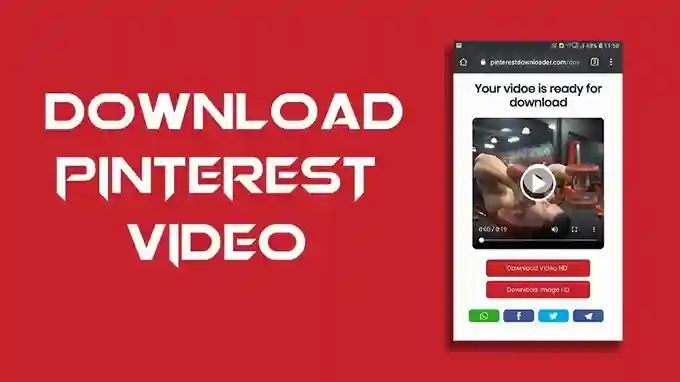
Pinterest Downloader là công cụ trực tuyến miễn phí giúp bạn tải video Pinterest. Bạn cũng có thể tải hình ảnh và Gif từ Pinterest trực tiếp về máy tính, máy tính bảng hoặc điện thoại của mình bằng Pinterest Downloader. Bạn có thể lưu và tải video Pinterest ở định dạng MP4 chất lượng cao và tải hình ảnh Pinterest ở định dạng JPG HD với Pinvids.com. Tại sao chúng tôi phát triển Pinterest Downloader? Bởi vì chúng tôi nhận thấy Pinterest không cho phép tải video, điều này khiến mọi người gặp khó khăn khi tải video Pinterest. Pinterest Downloader là giải pháp cho những ai muốn tải video Pinterest theo cách miễn phí và dễ dàng.
Cách sử dụng Trình tải xuống Pinterest?
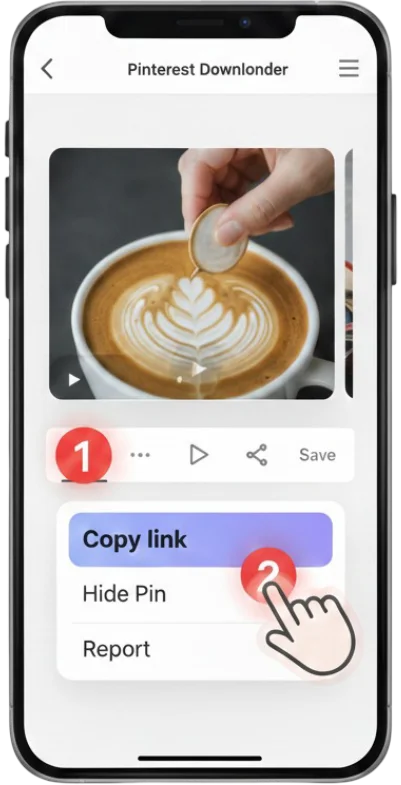
1 #1. Sao chép URL video
Sao chép URL video Pinterest mà bạn muốn lưu.
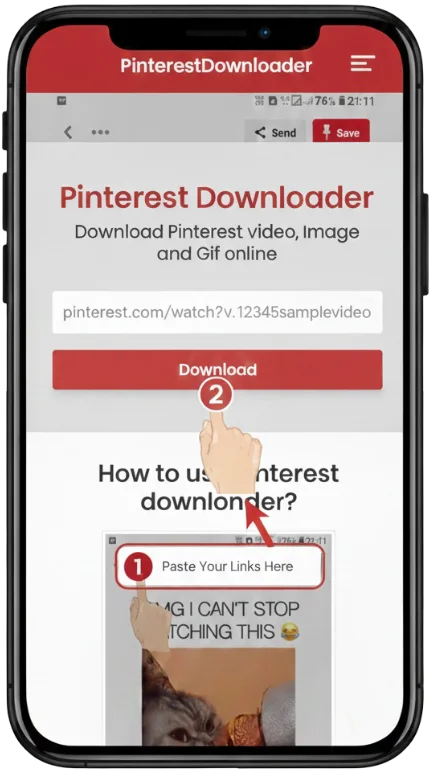
2 #2. Dán liên kết
Dán URL video Pinterest mà bạn đã sao chép vào ô nhập tải xuống, sau đó nhấp nút tải xuống.
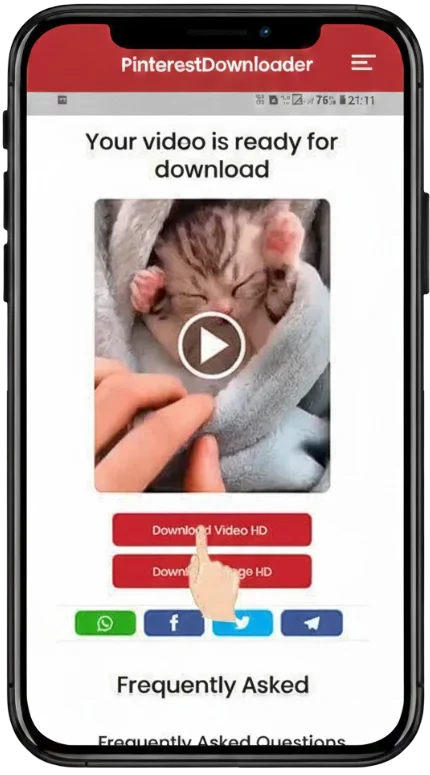
3 #3. Tải video
Chỉ cần nhấp vào nút tải xuống và quá trình tải sẽ bắt đầu.
Why Choose Pinvids for Pinterest Video Downloads?
🎬 Ultra-HD & 4K Support
We extract the original source quality, supporting 720p, 1080p Full HD, 2K, and even 4K resolutions. If it’s high definition on Pinterest, you get it in HD here.
⚡ No Watermarks & No Sign-Up
Download clean videos every time. Unlike other tools, we never add watermarks. You don’t need an account or email—just paste the link and save your file.
📱 Compatible With All Devices
Whether you use an iPhone, Android, Mac, or Windows PC, Pinvids works perfectly. Our responsive design ensures a seamless download process in just three taps.
🛡️ Full Format Support
One tool for all your needs. Pinvids supports:
• Video Pins (MP4 Format)
• Idea Pins & Stories
• High-Resolution GIFs
• Standard Images (JPG/PNG)
Cách tải video, hình ảnh hoặc Gif từ Pinterest
Pinterest Downloader rất dễ sử dụng cho bạn. Bạn có thể tải video từ Pinterest dễ dàng mà không bị giới hạn. Bạn cũng không cần đăng ký hay trả bất kỳ khoản phí nào để tải xuống. Công cụ này hoàn toàn miễn phí. Hãy làm theo các bước đơn giản dưới đây để tải video Pinterest trực tuyến.
💻 #1. Sao chép URL video
- Nhấn vào biểu tượng ••• ở góc trên bên phải ứng dụng Pinterest. Nếu bạn đang dùng phiên bản mới, biểu tượng ••• sẽ nằm ở góc dưới bên phải. Sau khi nhấn •••, hãy chọn sao chép liên kết.
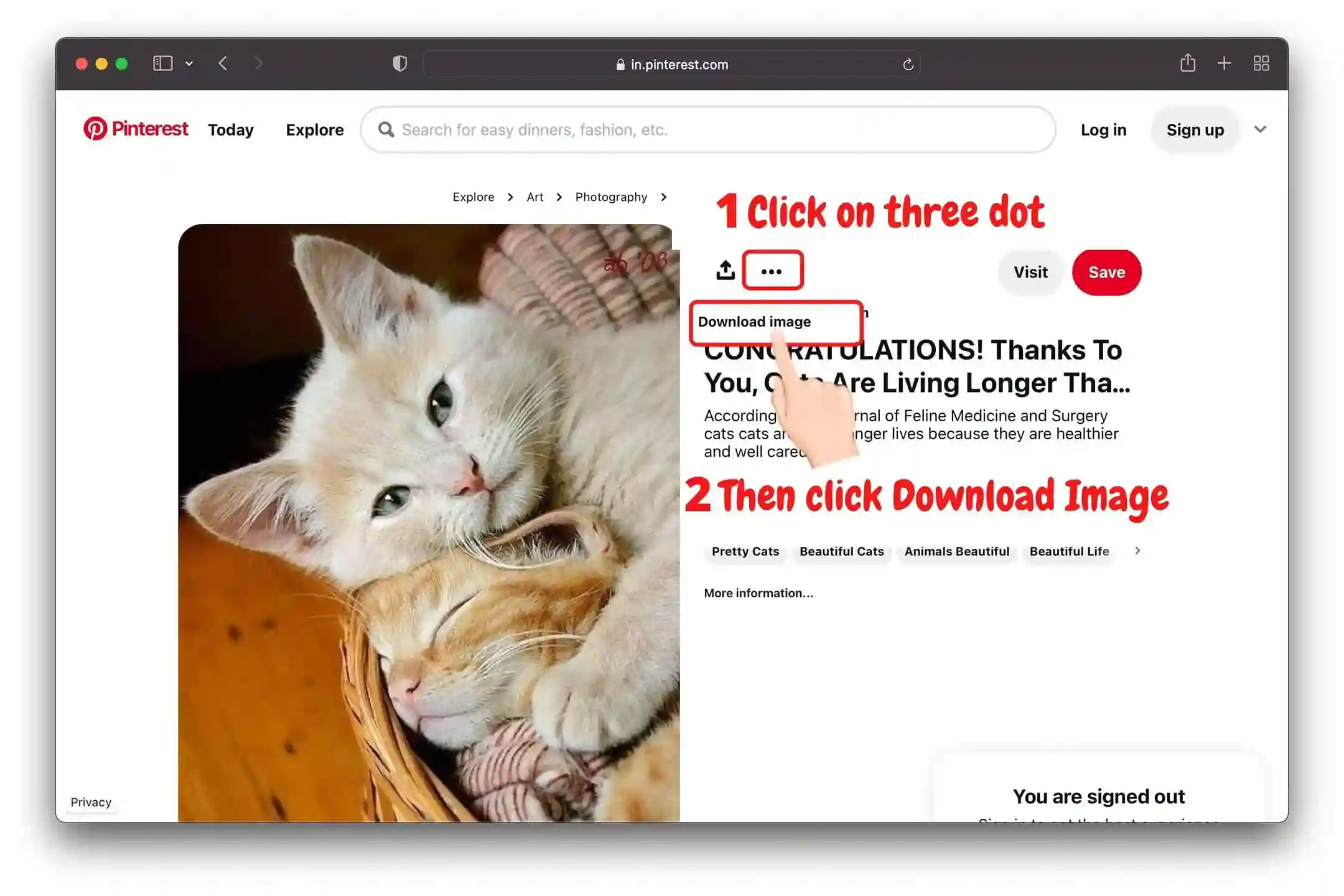
📱 #2. Dán liên kết
Dán URL video vào ô nhập Tải xuống và nhấn nút Tải xuống.
Hướng dẫn video
Supported Formats and Resolutions
🎥 Video
MP4 (720p, 1080p, 4K)
🖼️ Images
JPG, PNG, WEBP
✨ Animation
High-quality GIF
Is Pinvids Safe to Use?
Yes, PinVids is completely safe and designed with a privacy-first approach.
🛡️ Pinvids is Verified Safe: Google Safe Browsing | Norton Safe Web | TrustProfile
Câu hỏi thường gặp
No. Pinvids provides clean downloads in their original state. Unlike many other tools, we never add watermarks, logos, or branding to the videos or images you save..
Absolutely! Pinvids is mobile-friendly and works great on iOS devices.
No, the service is 100% free with no hidden charges.
Yes, downloading content for personal inspiration or offline viewing is generally permitted. However, you should not redistribute, sell, or claim ownership of the media. Always respect the original creator's intellectual property rights.
Check your internet connection and ensure the Pinterest link is from a public post.
No. We prioritize your security and do not store any user links or history.
Yes! You can download Pins, artwork, and boards using Pinvids.
Yes! Pinvids supports all Pinterest formats, including Reels, Stories, and traditional Pins. Our engine detects the highest available resolution (HD or 4K) to ensure you get the best possible quality