Premium Features of our Pinterest Photo Downloader
Intuitive User Interface
Our tool is designed for speed. There is no need to register, log in, or subscribe. Simply open the tool and save your images with one click.
Supports Multiple Formats
Save your photos in the format you need. We support HD, JPG, and PNG formats, ensuring you get the best quality without any watermarks.
4K & HD Downloads
Pinvids ensures you get the original upload quality. Save all your favorite wallpapers and Pins in stunning HD or 4K resolution.
Works on All Devices
Whether you are using Android, iOS, Windows, or macOS, our web-based tool works perfectly without requiring any app installation.
Cách sử dụng Trình tải xuống hình ảnh Pinterest?
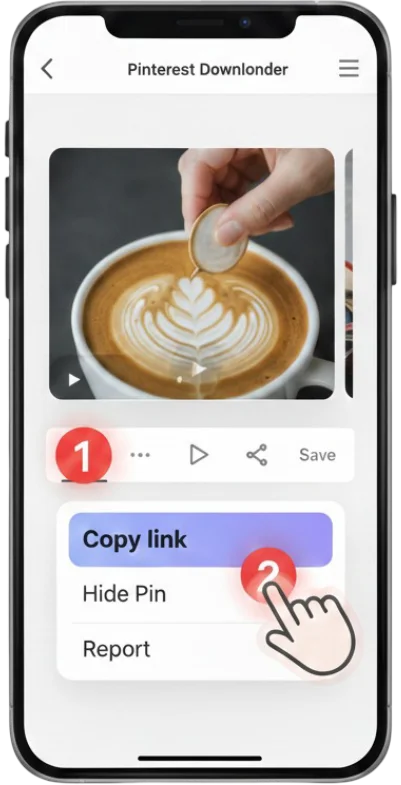
1 #1. Sao chép URL hình ảnh
Sao chép URL hình ảnh Pinterest mà bạn muốn tải.
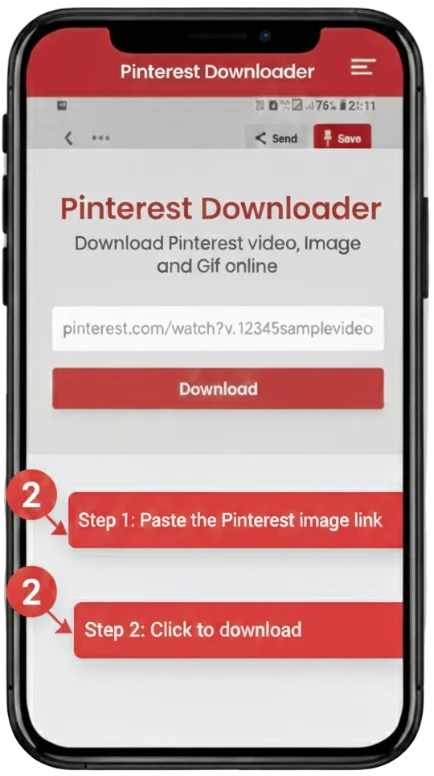
2 #2. Dán URL
Dán URL hình ảnh Pinterest vào ô nhập, sau đó nhấp nút Tải xuống.
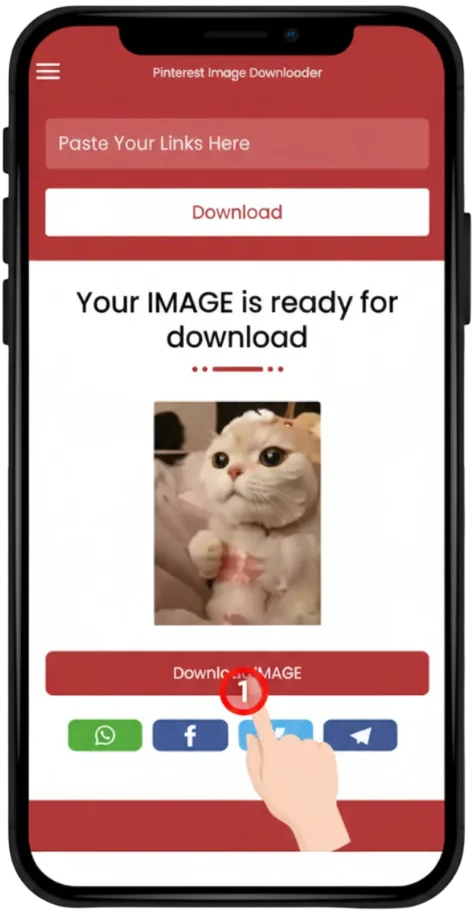
3 #3. Tải hình ảnh
Nhấp vào nút tải xuống để lưu hình ảnh, quá trình tải sẽ tự động bắt đầu.
Cách tải hình ảnh từ Pinterest
Tải hình ảnh từ Pinterest rất dễ dàng. Pinterest đã cung cấp sẵn tùy chọn tải hình ảnh, vì vậy bạn không cần công cụ nào khác để tải ảnh. Bạn có thể tải hình ảnh Pinterest mà không cần bất kỳ công cụ hỗ trợ nào.
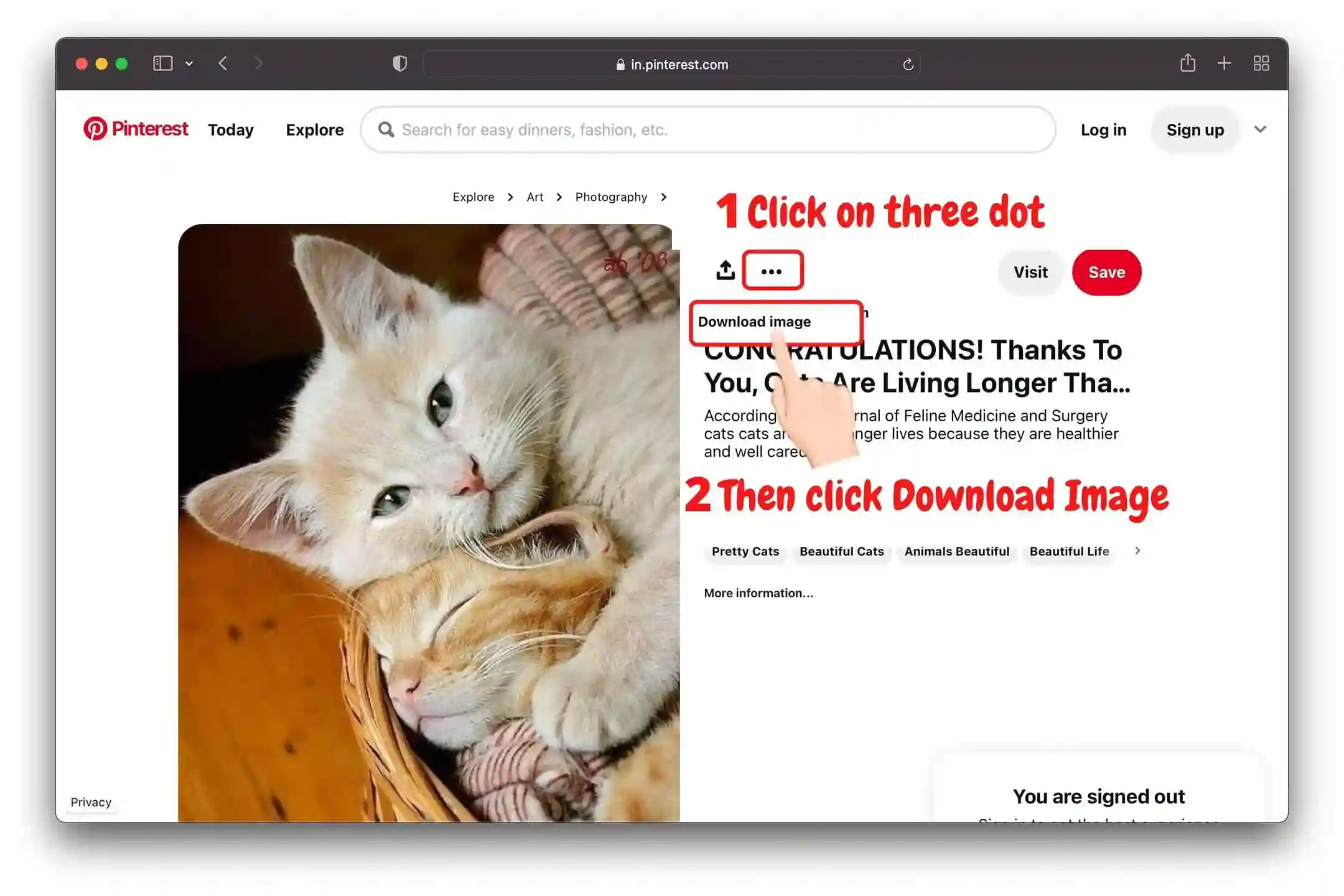
💻 Nếu bạn đang dùng trang web Pinterest, hãy làm theo các bước sau để tải hình ảnh:
- 📌 Chọn hình ảnh Pinterest mà bạn muốn tải xuống.
- 📌 Nhấp vào biểu tượng •••.
- 📌 Sau khi nhấp vào ba dấu •••, tùy chọn Tải hình ảnh sẽ xuất hiện.
- 📌 Nhấp vào tùy chọn Tải hình ảnh để tải ảnh Pinterest. Sau khi nhấp, hình ảnh sẽ được tải về thiết bị của bạn.
📱 Nếu bạn đang dùng ứng dụng Pinterest, hãy làm theo các bước sau để tải hình ảnh:
#1 Nhấn vào ba chấm
Chọn hình ảnh Pinterest rồi nhấn vào biểu tượng ba chấm.
#2 Nhấn vào Tải xuống
Để lưu hình ảnh Pinterest, hãy chọn Tải hình ảnh trong menu tùy chọn.
#3 Hình ảnh đã được tải
Sau khi nhấn Tải hình ảnh, ảnh sẽ được tải thành công về điện thoại của bạn.

Visual Guide: How to Save Pinterest HD Images

Is Pinvids Safe to Use?
Yes, PinVids is completely safe and designed with a privacy-first approach.
Image Downloader FAQs
Yes, you can save individual images, artwork, and Pins from any public board.
No registration or login is required. Pinvids is completely anonymous and free.
Yes! Our tool saves images in their original high resolution without any watermarks.
Paste the link into Pinvids, click download, and the image will save directly to your phone's photo library.
We support JPG, PNG, and WebP formats.
Currently, we only support single image downloads to ensure highest quality.
Ensure you are copying the link of the full-resolution image, not a thumbnail.
No, you can download as many images as you want.