Pinterest Video Downloader
Download Pinterest videos, Stories, and GIFs instantly. Save HD quality content with no watermarks and no registration.
What is the Pinvids Pinterest Downloader?
Pinvids is a powerful, web-based Pinterest video downloader tool designed for speed and simplicity. While Pinterest is a goldmine for creative ideas, it lacks a native way to save videos and GIFs to your device gallery. Pinvids fills that gap. Our high-speed cloud engine extracts media directly from Pinterest servers, allowing you to build an offline library for editing or inspiration. This tool is 100% free and works without any account registration. You can download videos in HD quality and images in original high-resolution JPG format. While Pinterest allows you to save 'Pins' to boards, it doesn't allow you to save files directly to your device. Pinvids is the perfect solution for anyone wanting to watch their favorite content offline, anytime, anywhere.
3 Simple Steps to Save Pinterest Videos on Mobile & PC
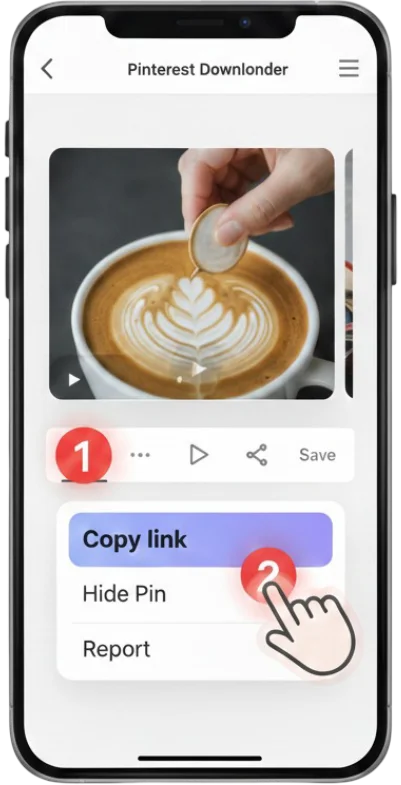
1 Go to Pinterest Website
Open Pinterest and copy the link of the Pinterest Video, Image, or GIF you want to save.
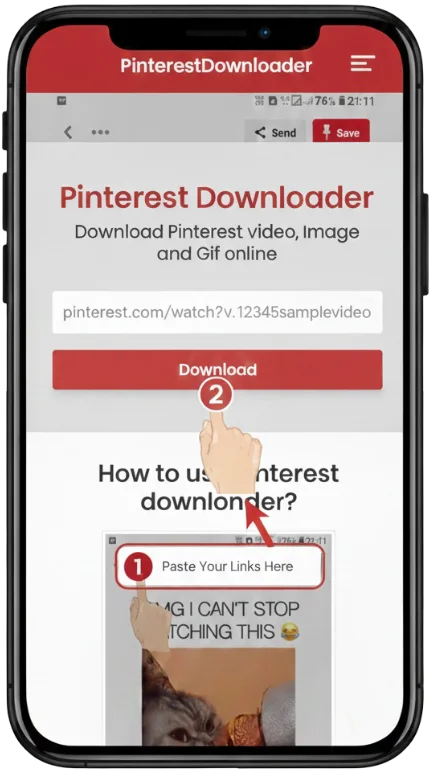
2 Paste in Pinvids
Paste the copied link into the search bar at the top of the Pinvids homepage.
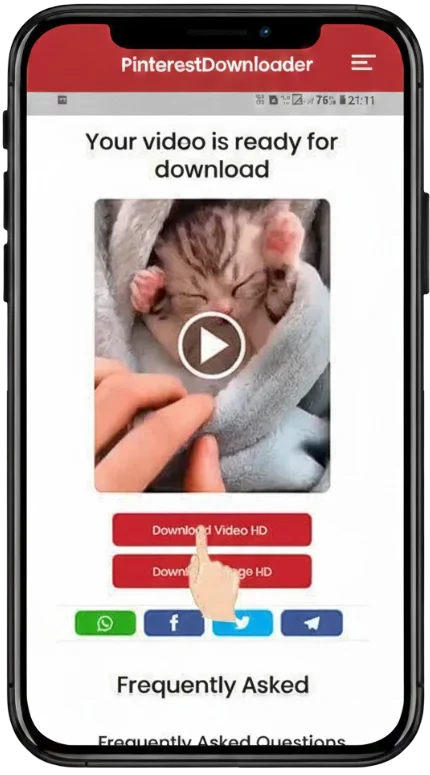
3 Download & Save
Click "Download" and choose your preferred resolution (HD, 1080p, or 4K) to save it.
Why Choose Pinvids for Pinterest Video Downloads?
🎬 Ultra-HD & 4K Support
We extract the original source quality, supporting 720p, 1080p Full HD, 2K, and even 4K resolutions. If it’s high definition on Pinterest, you get it in HD here.
⚡ No Watermarks & No Sign-Up
Download clean videos every time. Unlike other tools, we never add watermarks. You don’t need an account or email—just paste the link and save your file.
📱 Compatible With All Devices
Whether you use an iPhone, Android, Mac, or Windows PC, Pinvids works perfectly. Our responsive design ensures a seamless download process in just three taps.
🛡️ Full Format Support
One tool for all your needs. Pinvids supports:
• Video Pins (MP4 Format)
• Idea Pins & Stories
• High-Resolution GIFs
• Standard Images (JPG/PNG)
How to Download Pinterest Content on Any Device
Our tool simplifies the downloading process. Follow these easy steps to get your favorite videos and photos in seconds.
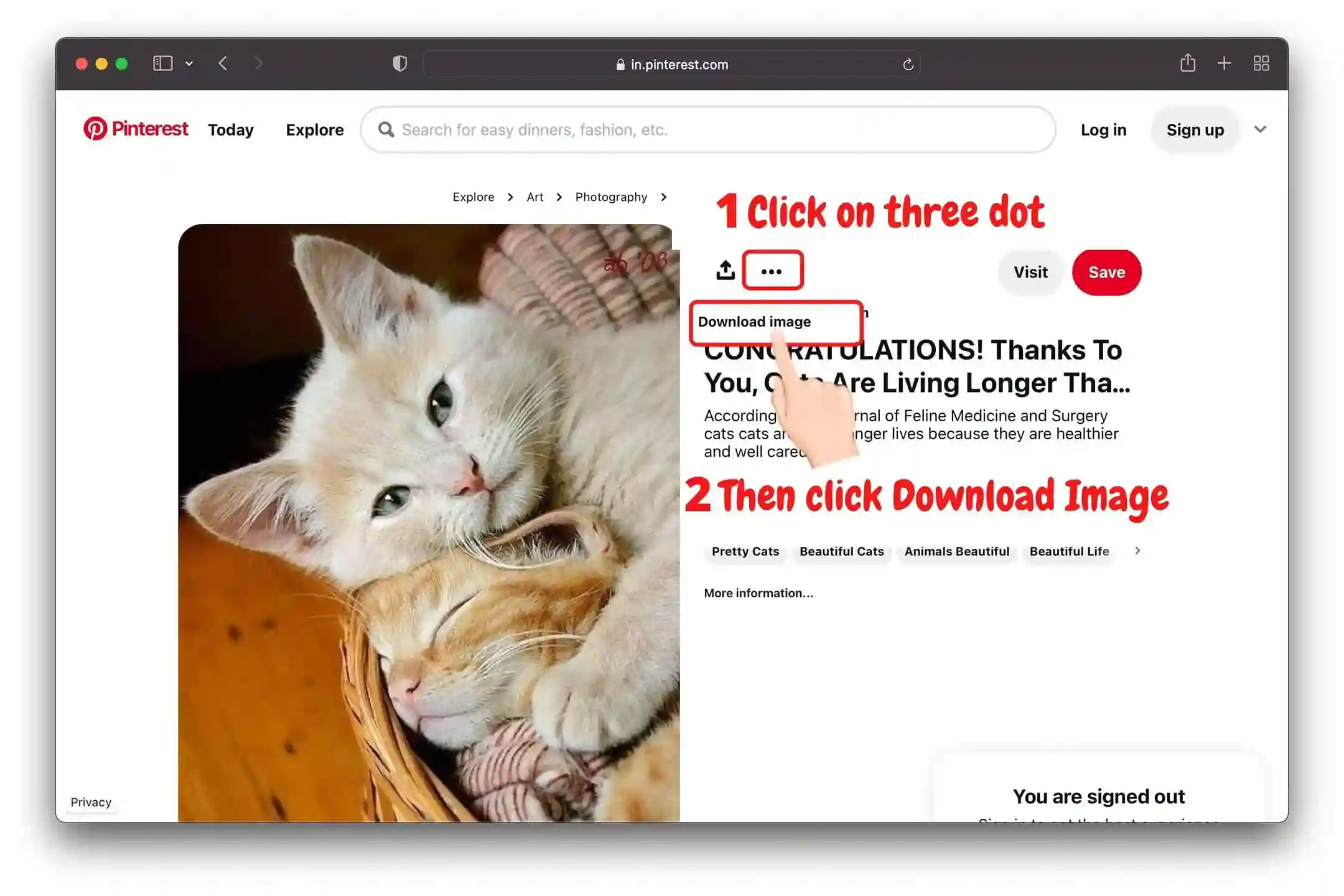
💻 Go to Pinterest Website
- 📌 Select the image you want to save. 📌 Click the three-dot (•••) icon on the image. 📌 Select the "Download Image" option from the menu. 📌 If the quality is low or the option is missing, paste the link in Pinvids for a better download.
📱 Paste in Pinvids
#1 Tap the Dots
Open the Pin and tap the three dots in the top corner.
#2 Tap Download
Choose "Download Image" from the options list.
#3 Check Gallery
Your image is now saved. Use Pinvids if you want to download GIFs or Videos.

Step-by-Step Video Guide

Supported Formats and Resolutions
🎥 Video
MP4 (720p, 1080p, 4K)
🖼️ Images
JPG, PNG, WEBP
✨ Animation
High-quality GIF
Is Pinvids Safe to Use?
Yes, PinVids is completely safe and designed with a privacy-first approach.
🛡️ Pinvids is Verified Safe: Google Safe Browsing | Norton Safe Web | TrustProfile
Pinterest Downloader FAQ
No. Pinvids provides clean downloads in their original state. Unlike many other tools, we never add watermarks, logos, or branding to the videos or images you save..
Absolutely! Pinvids is mobile-friendly and works great on iOS devices.
No, the service is 100% free with no hidden charges.
Yes, downloading content for personal inspiration or offline viewing is generally permitted. However, you should not redistribute, sell, or claim ownership of the media. Always respect the original creator's intellectual property rights.
Check your internet connection and ensure the Pinterest link is from a public post.
No. We prioritize your security and do not store any user links or history.
Yes! You can download Pins, artwork, and boards using Pinvids.
Yes! Pinvids supports all Pinterest formats, including Reels, Stories, and traditional Pins. Our engine detects the highest available resolution (HD or 4K) to ensure you get the best possible quality